

SitePrimed for WordPress — audit and fix from wp-admin.
Install free from WordPress.org. Check any page for Accessibility & EAA, SEO, UX and GEO — and apply the fixes you approve, right in your site.
What it does
Audit a page. See what's wrong. Land the fixes you approve.
The plugin is where you scan a page and where approved field fixes land. You review and approve every fix on the SitePrimed platform — nothing is changed without your say-so.
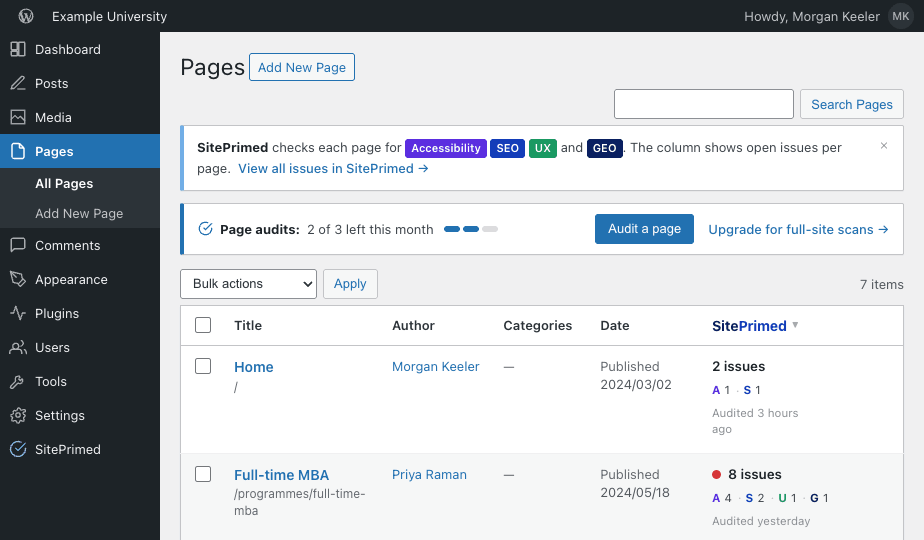
Audit from your Pages list or the editor
Every page gets a SitePrimed column and a Scan action. Open a page and audit it without leaving wp-admin — the scan runs in a real browser across mobile and desktop.
Connect it to the SitePrimed platform
One connection links your site to your SitePrimed account. Site-wide analytics and progress live in the platform; the plugin is where audits start and where approved fixes are written back.
See issues in context — with the visual locator
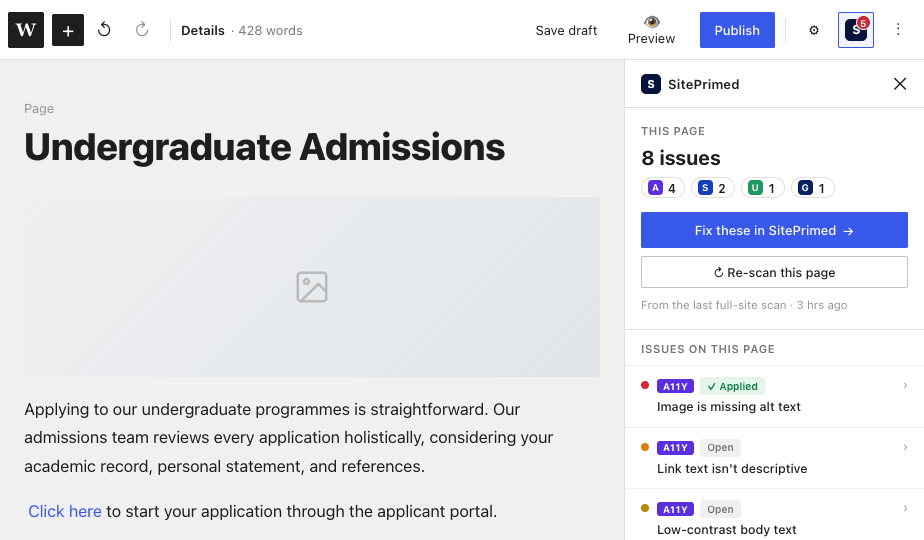
Every issue is plain-language, mapped to the exact element on the page, and shown on a screenshot so you know precisely where it is. Then: what's wrong, and how to fix it.
- Marked on a real screenshot of the page
- Grouped by rule, tagged with axe severity
- Content & metadata fixes applied in place; theme-level issues come with guidance
THE FIX
Fix, with you in control
SitePrimed suggests the fix. You review, edit and approve — nothing changes on your site without you.
Install
Add SitePrimed free from WordPress.org — like any plugin.
Connect your account
Link the site to your SitePrimed account with a scoped, revocable permission.
Audit
Scan a page from the Pages list or the editor across mobile and desktop.
Fix
Review & approve fixes on the platform; approved field fixes land in WordPress.
PLAN MODEL
Scan depth scales with your plan
The plugin is free on every plan. What changes is how much you can scan and fix.
Native to WordPress
It feels like part of wp-admin — because it is
No new dashboard to learn. SitePrimed shows up where you already work.
What does connecting actually grant?
Connecting grants SitePrimed a scoped, revocable permission to apply the fixes you approve —only the content and metadata you sign off on, never your theme, layout or code, never arbitrary access. Revoke it anytime in Settings.
Compatibility
Works with your WordPress
Block & classic editor
SitePrimed adds its panel in the Gutenberg block editor and works alongside the classic editor.
Multilingual
Audits and fixes run per-page, so multilingual sites are scanned language by language.
Requirements
WordPress 6.x+ (placeholder) · PHP 7.4+.
The plugin is free on every plan
Scan depth and fixes scale with your SitePrimed plan.
Run a free audit
Paste a URL and see your four-lens health in seconds — exactly what's wrong, and where.
Anonymous · one page · desktop + mobile · no account needed. We only read public pages.